
SocialAgents Pod builds autonomous AI personas that browse social platforms like real users, each driven by demographic and psychological profiles. Early experiments show recommendation algorithms quickly lock onto core interests, then probe adjacent topics – which agents often adopt. The goal is a scalable, auditable framework for studying how algorithmic exposure shapes beliefs.
Team Members: @Andreas Stavrou @Nikos Gkikizas
Introduction
Content-recommendation algorithms on social platforms do not simply match users to their existing interests – they actively introduce new content, test engagement and reinforce what sticks. Over time, this feedback loop reshapes what users see, engage with and ultimately come to believe. Understanding this process at scale is difficult with real users: you cannot control their starting profiles, isolate algorithmic influence from organic behavior or ethically run repeated experiments on their feeds.
To address this, we developed a framework for deploying AI-driven synthetic personas that browse social media the way real people do. Each agent is defined by a rich demographic and psychological profile and makes engagement decisions – scrolling, liking, saving, commenting, following – powered by a multimodal AI model that reasons over the agent’s personality and the content it encounters. By running controlled agents with known starting profiles, we can precisely track how platform algorithms adapt, expand and shift the content they serve over time. Early results show that within a single session the algorithm accurately identifies each agent’s core interests and then begins pushing content into adjacent territories the agent never sought out.
For a full discussion of the research motivation, methodology and experimental findings, see the SocialAgents Pod Executive Summary.
The sections below focus on the technical implementation: the tools, architecture and infrastructure required to run these simulations at scale.
Frameworks & Libraries
Various frameworks and libraries were considered but the ones that were finally adopted were SeleniumBase for browsing automation and PyAutoGUI for GUI automation.
SeleniumBase is a Python framework built on top of Selenium WebDriver that provides a higher-level, more “batteries included” way to write browser automation. Compared to writing raw Selenium, it gives you a cleaner test structure and a lot of helpers out of the box (smart waits, assertions, screenshots, logging, HTML reports), which reduces boilerplate and makes scripts easier to maintain. It also tends to integrate more smoothly with the browsers you already have installed on the machine, handling a lot of the setup and driver management for you so you can run against a “real” local Chrome/Edge/Firefox without as much manual configuration.
A key difference from plain Selenium is that SeleniumBase includes convenience modes and configurations that produce browser sessions closely resembling typical user behavior. For example, it manages browser flags, profile handling and wait strategies out of the box, driving the browser in ways that look closer to natural user sessions than a minimal Selenium script. In contrast, with raw Selenium you usually have to implement these reliability-related choices yourself, whereas SeleniumBase centralizes many of them behind simpler APIs and defaults.
PyAutoGUI is a Python library for automating interactions with your computer’s graphical user interface (GUI). It lets you programmatically control the mouse and keyboard to move the cursor, click, drag, scroll and type, which makes it useful for scripting repetitive tasks that would otherwise be done manually. Because it operates at the UI level, it can automate many desktop applications even when they do not expose an API.
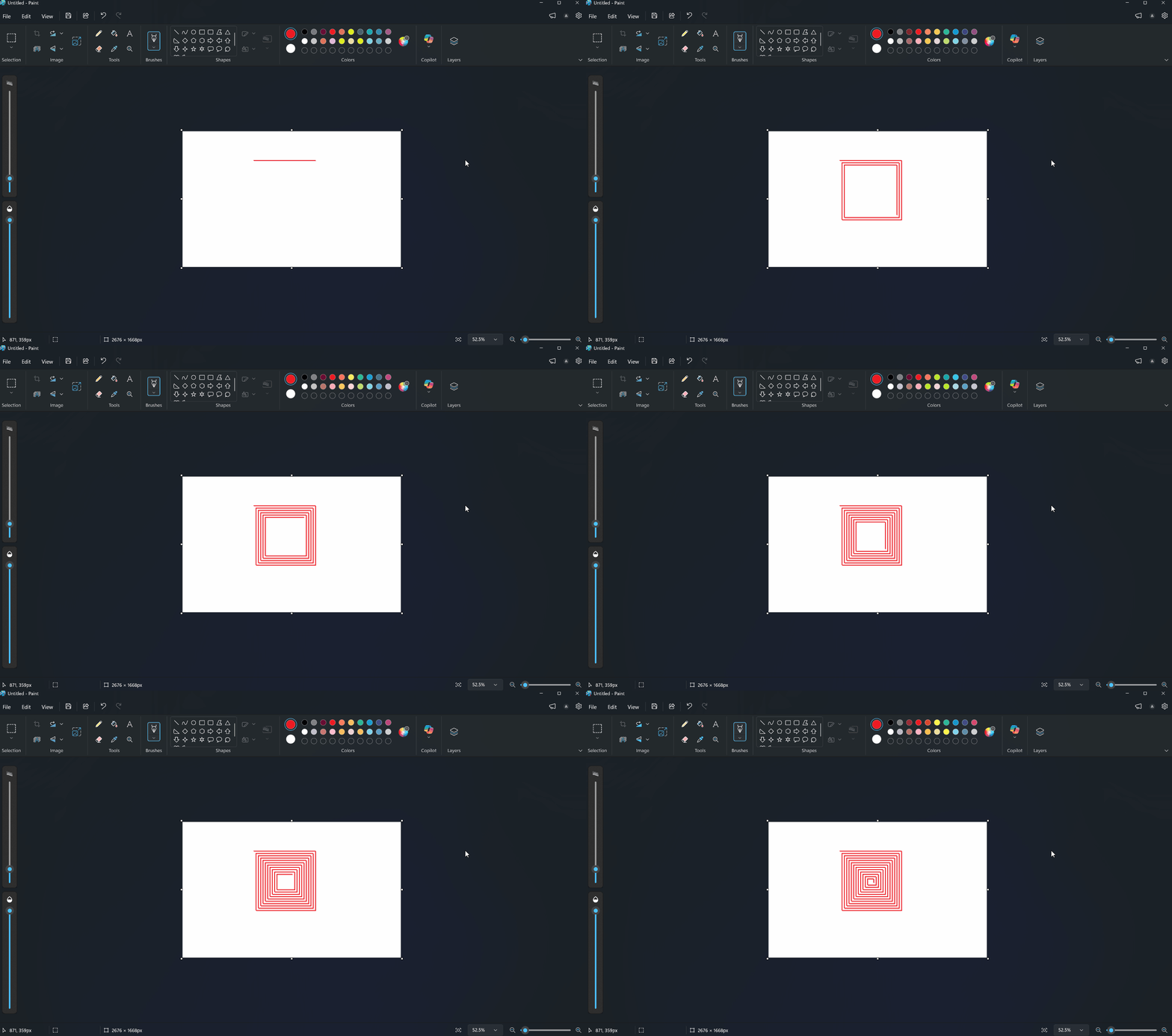
Figure 1 – Example of GUI automation using PyAutoGUI automating the use of Microsoft Paint
A key feature of PyAutoGUI is basic screen-based automation through image recognition: you can locate buttons or UI elements on the screen (via screenshots) and then click or interact with them based on their position. This is helpful for building lightweight “robot” scripts for workflows like form filling, desktop app navigation or testing simple user flows. In practice, it tends to be most reliable when paired with careful timing, consistent screen resolution and safeguards such as its built-in “failsafe” (moving the mouse to a corner to stop the script).
Here is a list of the most common methods:
pg.moveTo(x,y)– moves the mouse to position x,y (x, y pixels rom the top left corner)pg.click(x,y)– clicks in the x,y positionpg.write(text)– simulates consecutive keyboard pressespg.scroll(y)– scrolls y pixels verticallypg.hotkey(key1, key2)– can be used for keyboard combinations (i.e. ctrl-C, ctrl-V etc)pg.locateCenterOnScreen(image)– tries to locate an image in the screen and returns the coordinates of its center
Implementation & Examples
Two distinct approaches were tested and implemented, each detailed in the sections below.
The first approach combines SeleniumBase with GUI automation. SeleniumBase provides a mature, full-featured browser automation framework with built-in conveniences such as easy cookie access, configurable browsing modes and fine-grained session control. Pairing it with GUI automation brings the best of both worlds – robust browser-level control alongside OS-level input simulation.
The second approach relies on pure GUI automation. By controlling the mouse and keyboard directly, the agent is effectively indistinguishable from a real user. This offers greater control over all interactions, though it requires additional effort to replicate features that SeleniumBase provides out of the box (e.g., cookie handling, session management).
SeleniumBase & GUI automation
After exploring and testing various browser automation tools, we selected SeleniumBase for its maturity and the convenience it offers on top of the familiar Selenium framework. Sessions were configured with test mode and guest mode disabled and CDP mode activated, giving us a realistic browser environment. The most valuable feature for our use case was SeleniumBase’s straightforward cookie management, which we leveraged for cookie-based authentication flows.
Initially, we attempted a SeleniumBase-only approach, identifying and interacting with page elements via XPath selectors and similar methods. However, we found that combining SeleniumBase with GUI automation (PyAutoGUI) produced significantly more robust results. The framework handles higher-level concerns like session management, cookie handling and browser configuration, while GUI automation takes over at the interaction level, simulating mouse and keyboard input in a simple and reliable way.
In summary, SeleniumBase owns the session lifecycle and authentication layer, while PyAutoGUI drives all low-level user interactions (clicks, typing, scrolling), combining the strengths of both tools.
Pure GUI automation
Pure GUI automation operates at the OS level, generating mouse and keyboard inputs that are identical to those of a real user. This makes it a natural fit for producing browsing sessions that closely mirror genuine human behavior.
We developed an alternative method of simulating social media browsing using PyAutoGUI and visual automation. The pure GUI automation approach produced smooth, uninterrupted sessions on already warmed-up social accounts (the methodology can be seen here).
This approach will be expanded to more social platforms.
Agent Design
The decision-making core of the framework is a multimodal AI agent that runs continuously alongside the simulation, evaluating each post in real time as the browser scroller surfaces it. Rather than receiving a batch of posts upfront, the agent operates as a live judge – it is initialized once with the persona definition and a set of instructions and then processes posts one by one as the feed delivers them.
Each time the scroller encounters a new post, the agent receives a multimodal input bundle comprising:
- Visual content – the post’s image or video frames
- Contextual metadata – caption text, hashtags, account information and any other on-screen context captured during the session
- Persona definition – the full demographic, psychological and behavioral profile of the synthetic user
- Instructions – the evaluation prompt specifying the expected output format and decision criteria
Given these inputs, the agent returns a structured output containing the fields bellow:
- Interaction distribution – a probability distribution over all possible actions (scroll past, like, save, comment, follow, share), representing how likely the persona is to perform each action on this post
- Reasoning – a natural-language explanation grounding the decision in specific persona traits and content attributes
- Post description – a textual summary of the post’s content for downstream categorization and analysis
- Duration on post – A field that dictates how long to stay on any given post.
Every response is validated against a Pydantic model that enforces the expected schema, field types and value ranges. If the output fails validation, it is rejected and retried automatically.
We use Gemini 2.5 Flash Lite as the primary model, chosen for its speed, low latency and strong multimodal reasoning across image and video inputs. Gemini 2.0 Flash Lite serves as a fallback. The pipeline applies automatic retries with exponential backoff and graceful failover to the backup model if the primary is unavailable or returns repeated validation failures.
Once the agent produces a validated report for a post, the result is immediately appended to the simulation’s interaction log – a structured record capturing the post content, the persona’s response, the probability distribution and the reasoning trace. The simulation then scrolls to the next post and the cycle repeats until the session ends. After all posts in a session have been evaluated, the complete log is persisted and the experiment proceeds to the next session or enrichment cycle.
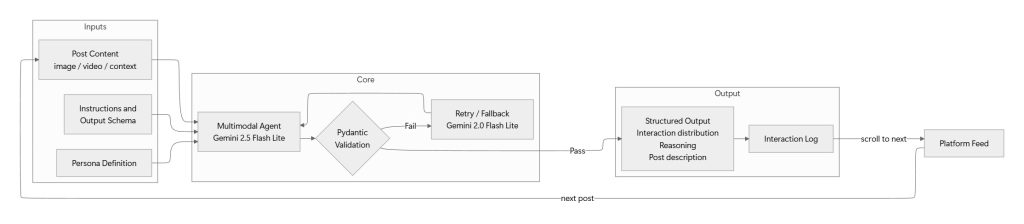
Figure 2 – Agent Design
Scalability & Containerization
Pure GUI automation relies on controlling a visible desktop session – every bot instance needs its own screen, mouse and keyboard which means you cannot spin up hundreds of headless processes on a single machine the way you can with browser-driver automation. Each additional agent requires a dedicated virtual display (e.g., via Xvfb or a VNC session) with a fixed resolution, so that interactions like locateCenterOnScreen that depend on approximate pixel matching are not fragile across different display configurations.
This is why we built a containerized version simulator, only for some social media using GUI-based browsing. This approach has been successfully tested on both MacOS and Windows, making the process much more scalable. The details can be found in the relevant Dockerfile. To use the solution follow the instructions written in the README.
Note that true scalability is throttled by the speed of creating and warming up new accounts. Further research is needed to determine if warming up can be also automated.
Replicating Results
This section provides a step-by-step guide for running a simulation and reproducing the results, assuming access to the repository.
- Configure and run the simulation
- Update the configuration file with the desired parameters (e.g., persona definitions, session duration). Then execute the social media scroller for the chosen platform. Each run produces a session log file as output.
- Understand the Log Structure
- Each row in the log represents a single post-persona pair and contains the following fields:
- Persona – the synthetic persona that encountered the post
- Interaction – the action taken (e.g., like, skip, scroll past, comment)
- Post description – a textual description of the post’s content
- Reasoning – the LLM-generated rationale behind the chosen interaction
- Each row in the log represents a single post-persona pair and contains the following fields:
- Categorize Post Descriptions
- Once the logs are collected, an LLM categorization step maps each post description to a known meta taxonomy. This step is not part of the core simulation – its purpose is to facilitate visualization and evaluation by grouping posts into standardized content categories.
- Analyze the results
- With the enriched logs (raw data + taxonomy labels) in hand, you can proceed with exploratory data analysis to examine patterns in content exposure, persona behavior, platform recommendation tendencies and any other dimensions of interest.
Limitations & Future Work
The following are the key limitations identified during development, along with proposed directions for addressing them.
Account Registration
Certain social media platforms require registration through Google accounts or phone numbers. As a result, scaling to new platforms or creating additional bot accounts may require access to these resources, which adds an external dependency to the setup.
LLM Latency & Engagement Signal Noise
The communication between the agent and the LLM introduces a non-trivial delay – averaging 3.4 seconds per interaction. During this time the agent remains idle on the current post and the platform logs this pause as content view time and engagement. This effectively sends an inflated engagement signal to the recommendation algorithm for every post, regardless of whether the persona would have lingered on it. While this is a known source of noise, we expect the impact to be roughly uniform across all posts, since every interaction incurs the same overhead. As such, relative comparisons between posts and personas should remain meaningful, even if absolute dwell-time metrics are skewed.
To mitigate the above, we’re planning on introducing a two-stage decision pipeline. A lightweight first stage – using classical machine learning models or small vision models – would make a rapid scroll-away vs. stay decision in near real-time. The full LLM call would only be triggered when the agent decides to stay, allowing the 3.4-second overhead to occur only on posts the persona has chosen to engage with – closely mimicking how a real user would pause before deciding on an action.

